Check Your ECU Before You Buy
Search supported vehicle manufacturers, ECU families and available solutions before purchasing MYCHIPTUNING. Find the ECU you work with and see the functions currently listed for that application.
Professional Windows ECU file-processing software • €2,500 software license • €300/year continued updates and service
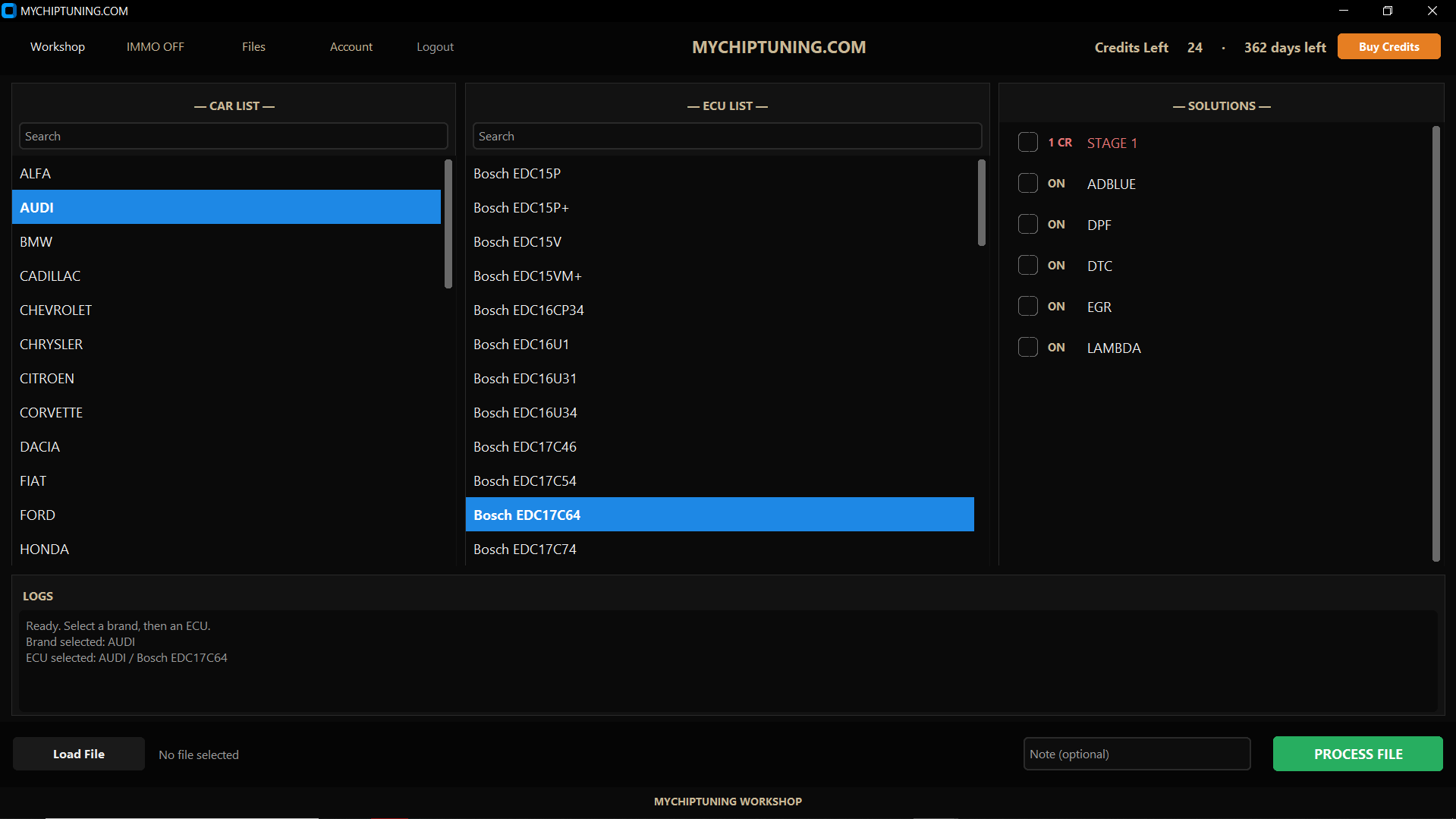
Find Your Vehicle, ECU and Available Solutions
Use the filters below to search the MYCHIPTUNING database. Coverage is organized by vehicle group, ECU / electronics family and the solutions currently listed for that ECU.
| Vehicle / Brand Group | ECU / Electronics | Available Solutions |
|---|
| Vehicle Brand | ECU / Electronics | Service | File Area |
|---|
What does “supported” mean?
A solution displayed for an ECU means that function is currently listed in the MYCHIPTUNING coverage database for that ECU family. Exact compatibility can still depend on ECU hardware, software version, file structure and vehicle configuration.
Automatic Where Supported. Manual When You Need an Engineer.
MYCHIPTUNING combines supported automatic file processing with an engineer-backed workflow for files that need additional review.
Supported File Processing
Select an available solution and process supported files directly inside the Windows desktop application.
Manual Processing Included
If an automatic solution returns an error, needs verification or requires additional work, submit the original file for manual engineer processing.
Missing ECU or Additional Function
If an ECU is not listed, or you need another compatible ECU-specific function, upload the file in the application and send a request to the engineering team.
Stage 1 Is Not a Generic One-Click File
Stage 1 files are exclusively prepared manually by an engineer. They are not generated as a generic automatic Stage 1 calibration.
Request a Manual Solution
Existing MYCHIPTUNING users can upload the original file and send a manual request when the ECU is not available or when additional compatible work is required.
Examples can include Pops & Bangs, Launch Control, Hardcut / Rev Limiter, speed-limiter related requests and other ECU-specific functions, subject to ECU compatibility and engineer review.
Check the Coverage Important to Your Workshop
MYCHIPTUNING is designed for professional tuning workshops and ECU specialists. Before purchasing, search the database for the vehicle groups, ECU families and functions you use most often.
Professional Windows desktop application and access to the supported vehicle, ECU and solution database.
ECU Coverage Questions
Is Stage 1 automatic?
No. Stage 1 files are exclusively calibrated manually by an engineer.
What if automatic processing gives an error?
Submit the original file through MYCHIPTUNING and request manual engineer processing.
What if my ECU is not listed?
Upload the original file and send a manual request to the engineering team. Pre-purchase compatibility questions can also be sent through the Contact page.
Does every ECU support every function?
No. Available functions vary by ECU family, software version, original file and vehicle configuration. Check the exact ECU entry above.
Search Your ECU Before You Purchase
Check exact coverage, then purchase the professional MYCHIPTUNING Windows software when it fits your workshop.
Compatibility & Use Notice: Availability of individual functions depends on vehicle configuration, ECU hardware/software and engineer review. Vehicle modifications must comply with applicable road-use, emissions, anti-theft and other legal requirements in the user's jurisdiction.